Product DESIGN

Saas

User Feedback

Evolution of Talent Card

Evolution of

Talent Card

*

Company

Company

Flexiple

Flexiple

Time Duration

Time Duration

Evolved over time

Evolved over time

View Live Project

View Live Project

About Flexiple

Flexiple is India's leading talent hiring platform that connects pre-vetted contractor and full-time professionals with companies worldwide.

Project Overview

Project Overview

At the heart of Flexiple's SaaS product is the Talent Card — a dynamically generated candidate profile that hiring managers use during shortlisting.

The Talent Card is where every hiring decision happens. It aggregates contact details, evaluation scores, CTC, notice period, custom company questions, call recordings, interview records, and more. As the platform grew, this card had to grow with it — and each growth phase brought a new design challenge.

At the heart of Flexiple's SaaS product is the Talent Card — a dynamically generated candidate profile that hiring managers use during shortlisting.

The Talent Card is where every hiring decision happens. It aggregates contact details, evaluation scores, CTC, notice period, custom company questions, call recordings, interview records, and more. As the platform grew, this card had to grow with it — and each growth phase brought a new design challenge.

Objective

Objective

Our hiring managers were spending too long on each candidate card. The data was all there, but it wasn’t organised in a way that helped them decide faster.

The core challenge:
🎯 Show a large amount of structured and unstructured candidate data without overwhelming the reviewer

🎯 Keep frequently-edited fields like CTC and notice period easy to access and edit

🎯 Scale the interface to accommodate entirely new features (interviews, tests, automations, tasks) as the product grew

🎯 Support two different review modes — a quick scan of multiple candidates, and a deep-dive into a single profile

Our hiring managers were spending too long on each candidate card. The data was all there, but it wasn’t organised in a way that helped them decide faster.

The core challenge:
🎯 Show a large amount of structured and unstructured candidate data without overwhelming the reviewer

🎯 Keep frequently-edited fields like CTC and notice period easy to access and edit

🎯 Scale the interface to accommodate entirely new features (interviews, tests, automations, tasks) as the product grew

🎯 Support two different review modes — a quick scan of multiple candidates, and a deep-dive into a single profile

Problems found

Problems found

Hiring decisions require a lot of data. But dumping all of it on one screen doesn't help anyone decide faster, it just creates noise.
At every stage of this project, the same core tension kept showing up: the more complete the card got, the harder it became to use.

Here's what we kept running into:

  1. Information hidden behind extra clicks: The most-used fields — CTC, notice period, location — were buried inside a popup. Hiring managers were clicking in and out of it on almost every single candidate. A small friction, multiplied dozens of times a day.

  2. The popup growing beyond its purpose: As the product captured more data, the popup became the very thing we were trying to avoid — an overwhelming wall of information with no hierarchy.

  3. No room for new features: Every time a new capability shipped (interviews, automations, tests), there was no clear place to put it. The layout had to stretch, and each stretch made it harder to navigate.

  4. One view for two very different tasks: A manager scanning 20 candidates to make quick calls has completely different needs from one doing a deep review of a single shortlisted profile. The interface treated both the same.

Therefore our core question at every stage was:

"“How do we give hiring managers everything they need, without making them hunt for it?”"

"“How do we give hiring managers everything they need, without making them hunt for it?”"

Approach

Approach

Version 1:
The Foundation — Simple, Focused, Action-Oriented

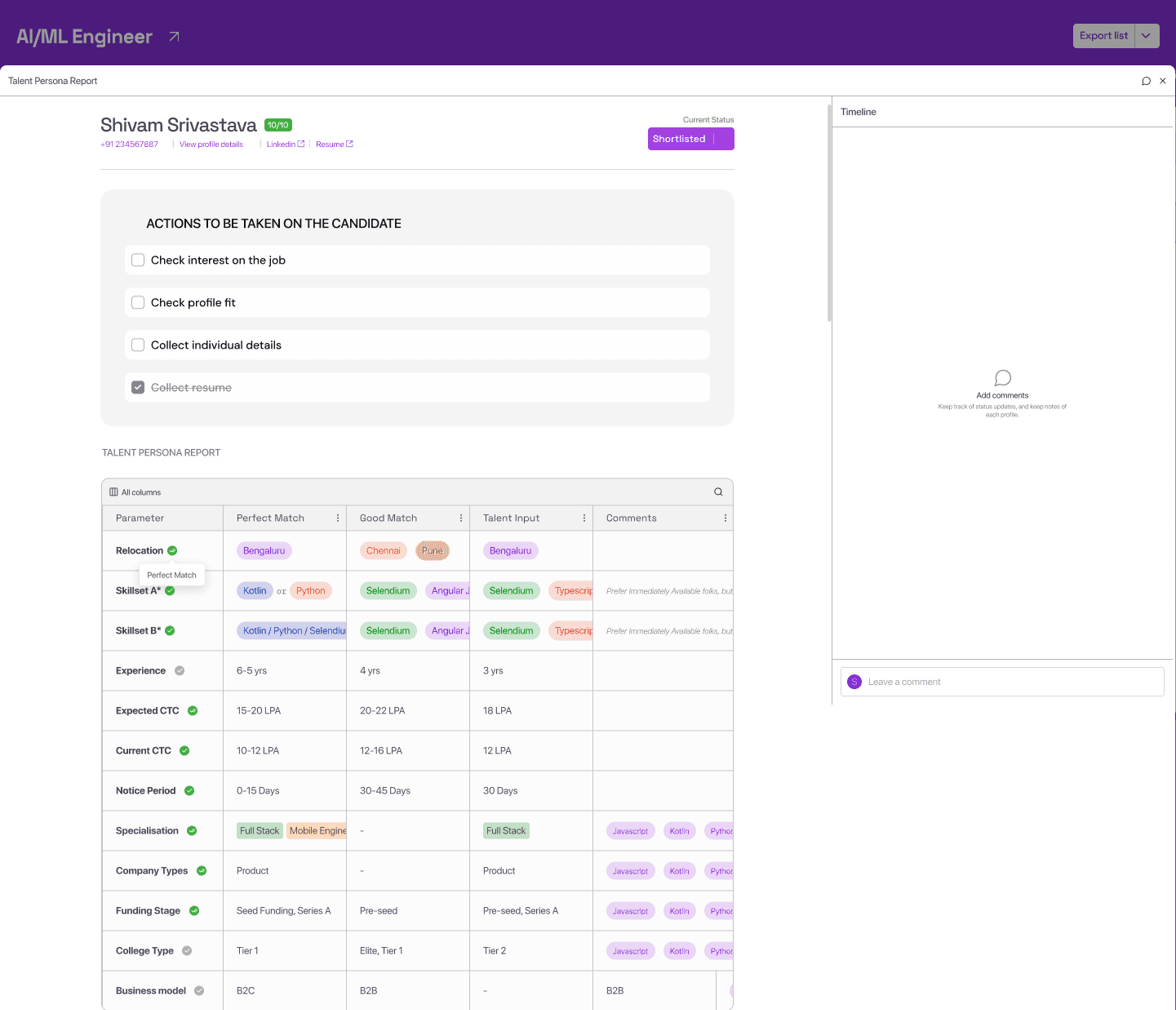
The design philosophy for V1 was to avoid overwhelming hiring managers upfront. Show only the essentials. Hide everything else behind a popup. Let users drill down when they need to.

The design philosophy for V1 was to avoid overwhelming hiring managers upfront. Show only the essentials. Hide everything else behind a popup. Let users drill down when they need to.

Design principle: “Don’t show everything — show just enough to act. Let users drill down when they need more.”

Design principle: “Don’t show everything — show just enough to act. Let users drill down when they need more.”

What we built

  • Name, Score & Contact Details at the top

  • Action buttons (shortlist / reject / move) in the middle

  • Talent Persona Report at the bottom — showing candidate fit vs. hiring personas

  • Side Timeline for updates and notes, inspired by PipeDrive CRM

  • Detail popup on click for deeper information

  • Name, Score & Contact Details at the top

  • Action buttons (shortlist / reject / move) in the middle

  • Talent Persona Report at the bottom — showing candidate fit vs. hiring personas

  • Side Timeline for updates and notes, inspired by PipeDrive CRM

  • Detail popup on click for deeper information

The thinking

  • Keep the main card clean. Surface only the most critical signals. Let hiring managers act immediately without scrolling through pages of data.


  • The PipeDrive-style timeline kept all candidate activity in one running log — no information lost, just not shown by default.

  • Keep the main card clean. Surface only the most critical signals. Let hiring managers act immediately without scrolling through pages of data.


  • The PipeDrive-style timeline kept all candidate activity in one running log — no information lost, just not shown by default.

Drawbacks

The popup approach worked in theory — but in practice, the fields being hidden were ones that hiring managers edited or atleast checked on almost every single candidate. The extra click wasn’t a minor friction point. It added up across dozens of reviews.


Additionally, as we needed to capture more information, the popup started growing. It was no longer a clean overflow area — it was becoming its own overwhelming interface.

Version 2:

The Split Layout — Editable Fields & Richer Context

After gathering feedback from hiring managers and operations teams, two things were clear:
1. Frequently-edited fields needed to be upfront,
2. The popup model couldn’t scale.

The solution was a structural shift to a split left-right layout with a tabbed right panel.

After gathering feedback from hiring managers and operations teams, two things were clear:
1. Frequently-edited fields needed to be upfront,
2. The popup model couldn’t scale.

The solution was a structural shift to a split left-right layout with a tabbed right panel.

“I always had to click through just to see the most basic things. To check a candidate's notice period or location, I had to open a popup and dig through it. It felt like the information was hiding from me.”

Deepika Bhayani, Hiring Manager

“I always had to click through just to see the most basic things. To check a candidate's notice period or location, I had to open a popup and dig through it. It felt like the information was hiding from me.”

— Deepika Bhayani, Hiring Manager

New Bottleneck: Introduction of New Features in the product

V2 wasn’t just a layout change — it introduced two significant new capabilities:

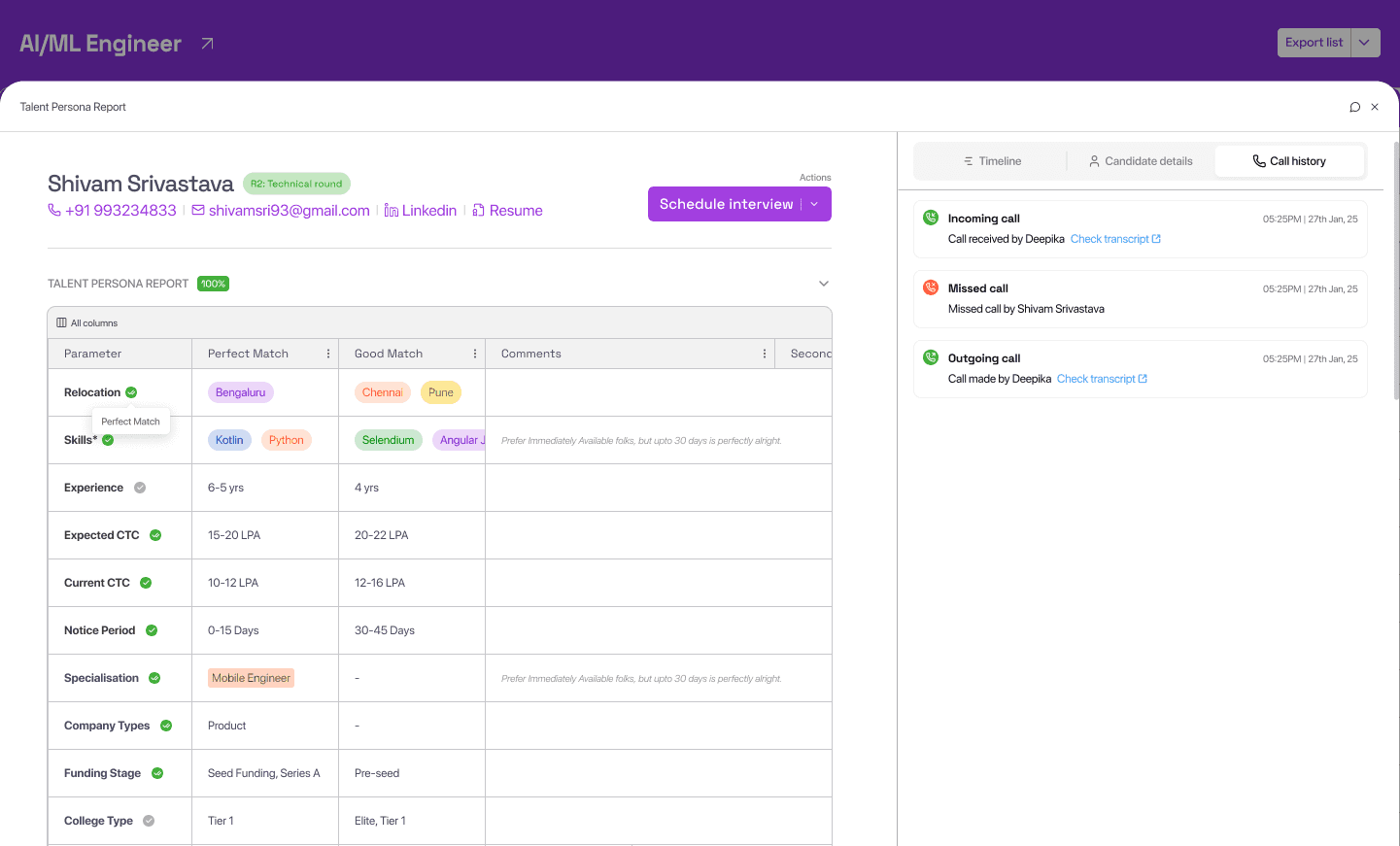
  • Call History: Flexiple began recording and tracking calls between hiring managers and candidates. This was surfaced as a dedicated tab in the right panel, giving reviewers full context of past conversations.

  • Custom Questions: Companies could ask their own bespoke, subjective questions about candidates. Answers varied by company and role, providing a more personalised view of each candidate that went beyond standardised scores.

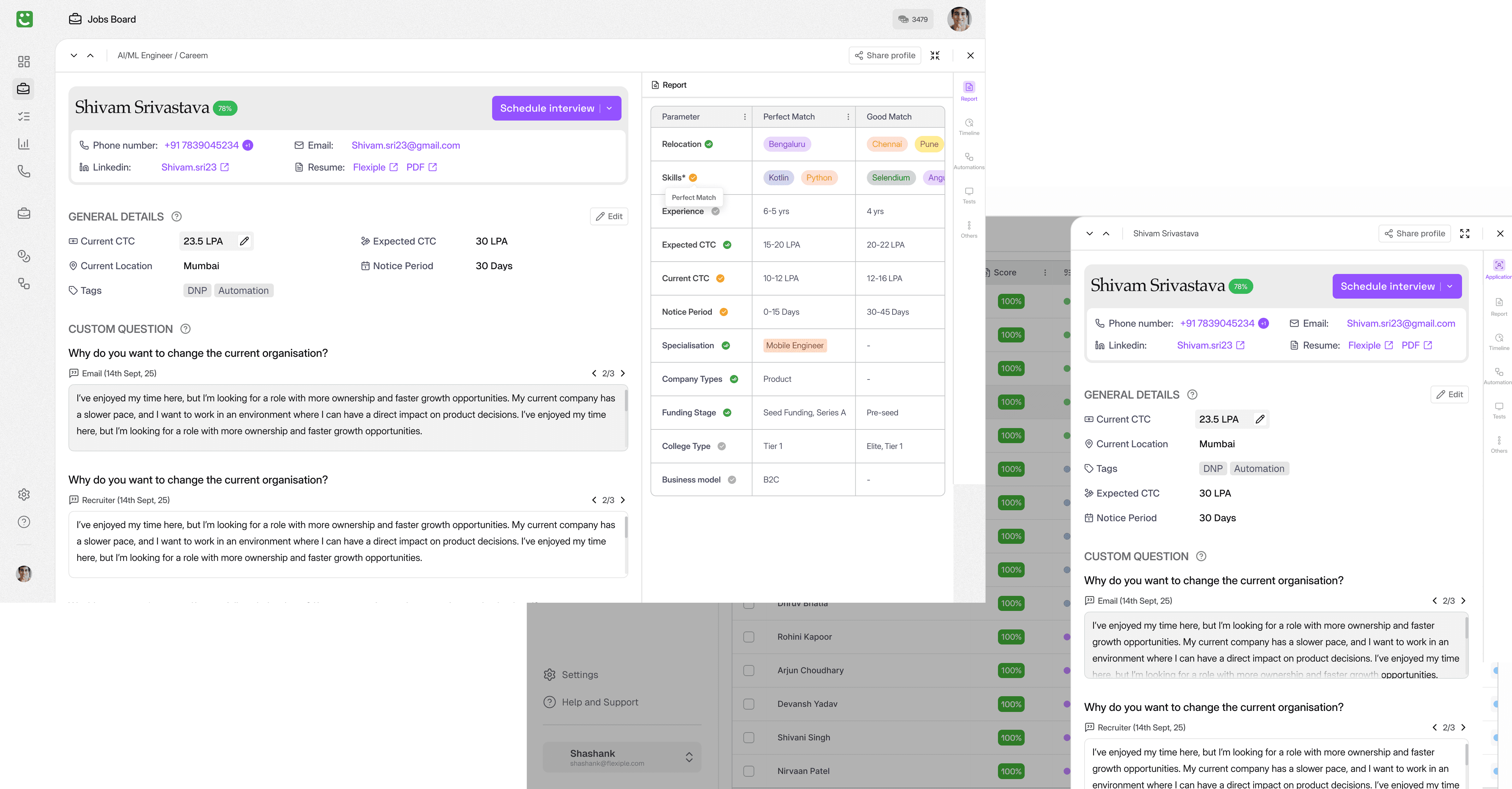
Left side (unchanged core)

  • Name, Score & Contact Details at the top

  • Shortlisting action buttons

  • Talent persona report

  • Candidate Details — CTC, notice period, location has been moved from here


Right side (new tabbed panel)

  • Candidate Details — CTC, notice period, location (editable)

  • Timeline — carried over from V1

  • Call History — NEW: tracking call recordings

  • Custom Questions — NEW: company-specific, subjective questions

  • Candidate Details — CTC, notice period, location (editable)

  • Timeline — carried over from V1

  • Call History — NEW: tracking call recordings

  • Custom Questions — NEW: company-specific, subjective questions

Drawbacks

V2 solved the popup problem. But by the time we were adding new features like interviews, automations, and tests to the platform, a new challenge appeared: the two-column layout couldn’t absorb this level of complexity without becoming just as overwhelming as the original popup.

Version 3:

The Scalable System — Three Zones & Contextual Viewing

As Flexiple’s platform matured, a significant number of new features were added that all needed to live within the Talent Card interface:

  1. Interviews (scheduling & tracking)

  2. Automations (status-triggered workflows)

  3. Other Jobs (other roles the candidate applied to)

  4. Tasks (action items for hiring managers)

  5. Timeline & Call History (carried from V2)

As Flexiple’s platform matured, a significant number of new features were added that all needed to live within the Talent Card interface:

  1. Interviews (scheduling & tracking)

  2. Automations (status-triggered workflows)

  3. Other Jobs (other roles the candidate applied to)

  4. Tasks (action items for hiring managers)

  5. Timeline & Call History (carried from V2)

“By the time we had interviews, tests, and automations all running, the old layout just couldn’t hold it. Every new feature made the page longer and harder to navigate. I dreaded opening it.”

Parteek Sood, Senior Operation Manager

“By the time we had interviews, tests, and automations all running, the old layout just couldn’t hold it. Every new feature made the page longer and harder to navigate. I dreaded opening it.”

— Parteek Sood, Senior Operation Manager

Solution: Ver.3 — The Three-Zone Layout

Version 3 introduced a structured separation of concerns: the left panel answered ‘Who is this candidate?’ and the right sidebar answered ‘What do I need to do with them?’

“Left panel = Who is this candidate? · Right sidebar = What do I need to do with them?”

“Left panel = Who is this candidate? · Right sidebar = What do I need to do with them?”

Left Panel (fixed)

  • Contact Card: Phone, Email, LinkedIn, resume

  • Basic Details: CTC, notice period, location, tags (frequently accessed & edited)

  • Custom Questions: marked as ‘Advanced Details’, below the basics

Right Sidebar (Sidebar navigation)

  • Interviews

  • Automations

  • Tests

  • Other Jobs

  • Tasks

  • Timeline

  • Call History

Solution: Ver.3 — The Three-Zone Layout

Couple of weeks after launching V3, I saw a key behavioural pattern being emerged:

“Most of the time they just needed to quickly check one thing — has this candidate been interviewed yet, or did they complete the test? They didn’t need to see their entire profile every single time but they stil have to open the full card, navigate to that particular navigation, close the card and repeat.

Do they really need to go through all of this. There must be an efficient way”

Shashank (Me), Product Designer

“Most of the time they just needed to quickly check one thing — has this candidate been interviewed yet, or did they complete the test? They didn’t need to see their entire profile every single time but they stil have to open the full card, navigate to that particular navigation, close the card and repeat.

Do they really need to go through all of this. There must be an efficient way”

Shashank (Me), Product Designer

V3.1 — Half Sidebar/Sheet (For quick reviews)

  • For quick checks. Slides in from the right. Candidate list stays visible.

  • Check one section, close or move to the next candidate from the nav arrows

V3 — Full Page View (For thorough reviews)

  • Opens the complete left panel + right sidebar.

  • Used when a hiring manager needs to evaluate a candidate end-to-end.


Final Solution: Ver. 3.1

V3.1 solved this with a half-width sidebar that slides in from the right, keeping the full candidate list visible behind it. No context switching.
No full-page load.
Just the section they needed.

The Journey at a Glance

The Journey at a Glance

Version

Version

V1

V1

V2

V2

V3

V3

V3.1

V3.1

Layout

Layout

Single page + detail popup

Single page + detail popup

Left–right split, tabbed right panelV2

Left–right split, tabbed right panelV2

Fixed left panel + right sidebar nav

Fixed left panel + right sidebar nav

Half-sidebar over candidate list

Half-sidebar over candidate list

Key Additions

Key Additions

Score, actions, persona report, PipeDrive timeline

Score, actions, persona report, PipeDrive timeline

Editable fields, call history, custom questions, bulk actions

Editable fields, call history, custom questions, bulk actions

Interviews, automations, tests, other jobs, tasks

Interviews, automations, tests, other jobs, tasks

Contextual single-section view

Contextual single-section view

Design Driver

Design Driver

Avoid overwhelming users

Avoid overwhelming users

Surface frequent fields, scale data capture

Surface frequent fields, scale data capture

Scale to complex features without clutter

Scale to complex features without clutter

Quick scanning without losing list context

Quick scanning without losing list context

Challenges

Challenges

Every design problem we faced was a direct consequence of the product growing faster than the layout could handle. Here's what we were up against at each stage:

  1. Every new feature was a layout bomb: Interviews, tests, automations — each new feature had no natural home. The layout kept stretching to fit, until it couldn't anymore.

  2. One screen, two very different jobs: Scanning 30 candidates and deep-reviewing one shortlisted profile are completely different tasks. We were forcing both into the same view.

  3. "Complete" data was drowning "important" data: CTC and notice period — touched on almost every candidate — sat at the same visual level as fields that barely changed. Hierarchy here wasn't aesthetic, it was functional.

  4. The popup that ate itself: It started as a clean overflow area. Then the product grew, and so did the popup — until it became the very problem it was meant to solve.

  5. Dev constraints shaped every decision: Parsing limitations, edge cases, backend rules — close collaboration with the dev team meant these didn't become user-facing surprises.

Every design problem we faced was a direct consequence of the product growing faster than the layout could handle. Here's what we were up against at each stage:

  1. Every new feature was a layout bomb: Interviews, tests, automations — each new feature had no natural home. The layout kept stretching to fit, until it couldn't anymore.

  2. One screen, two very different jobs: Scanning 30 candidates and deep-reviewing one shortlisted profile are completely different tasks. We were forcing both into the same view.

  3. "Complete" data was drowning "important" data: CTC and notice period — touched on almost every candidate — sat at the same visual level as fields that barely changed. Hierarchy here wasn't aesthetic, it was functional.

  4. The popup that ate itself: It started as a clean overflow area. Then the product grew, and so did the popup — until it became the very problem it was meant to solve.

  5. Dev constraints shaped every decision: Parsing limitations, edge cases, backend rules — close collaboration with the dev team meant these didn't become user-facing surprises.

Collaboration

Collaboration

Hiring Managers & Ops Managers

Regular feedback sessions after each version launch. Their day-to-day frustrations, repetitive clicks, cluttered layouts, etc. directly shaped every structural decision.

Development Team

Worked closely to understand data structure constraints and API limitations at each stage, ensuring every design decision was buildable before it was finalised.

Business Impact

Business Impact

~50-60%

Reduction in

decision time

8–12 min → 4–5 min

per candidate

Faster candidate

throughput

5–7 → 12–15 candidates

reviewed per hour
Create a free website with Framer, the website builder loved by startups, designers and agencies.